Depositing on 883V Game is fast. JazzCash and EasyPaisa deposits land in your wallet within minutes. Taking your earnings out is equally straightforward. Zero platform fee deducted. Zero tax taken by us. Your full requested amount goes to your mobile wallet.
This page covers every step of both processes and the specific mistakes that cause most delays.
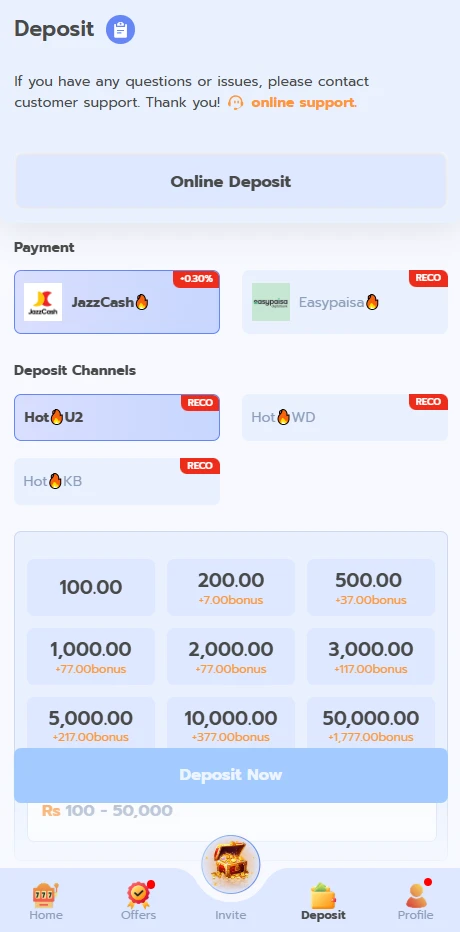
Payment Methods
| Method | For Deposits | For Withdrawals | Speed |
| JazzCash | Yes | Yes | Minutes |
| EasyPaisa | Yes | Yes | Minutes |
| Bank Transfer | Yes | Yes | Few hours |
Deposit Guide
Step 1. Log in and tap the Wallet icon on your dashboard.
Step 2. Tap Deposit.
Step 3. Choose your payment method from JazzCash, EasyPaisa, or Bank Transfer.
Step 4. Enter your deposit amount. Minimum is 100 PKR for mobile wallets.
Step 5. The screen shows you payment details specific to your selected method and this specific transaction. These are the only details you use. Do not send money to any other number regardless of what you see shared elsewhere.
Step 6. Complete the payment from your wallet or bank app.
Step 7. Return to 883V Game and keep the app or browser open. Your balance updates within minutes.
JazzCash Deposit: Specific Steps
Select JazzCash in the Deposit section. The screen shows an account number and a reference code. Open your JazzCash app. Send the deposit amount to that account number. Put the reference code in the payment description or message field. Return to 883V Game. Your wallet updates within minutes.
EasyPaisa Deposit: Specific Steps
Select EasyPaisa in the Deposit section. Note the account number and reference shown on screen. Open your EasyPaisa app or use USSD. Transfer the amount to that account number. Include the reference code in the description field. Your wallet updates within minutes of the payment going through.
Four Things That Cause Deposit Delays
Sending money to an account number from outside the app. The payment details inside 883V Game are the only correct ones. Anything shared on social media, WhatsApp, or Telegram claiming to be deposit details for 883V Game is not from us.
Leaving out the payment reference. The reference code links your specific payment to your specific account. Without it, the transaction has to be matched manually. This takes significantly longer than an automatic match. Always include it.
Closing the app or browser before the balance updates. The platform confirms transactions in real time. Keep it open for a few minutes after completing your payment.
Sending the same deposit twice. If your balance has not updated after five minutes, wait five more. Do not send the same payment again. Contact support after ten minutes if still unresolved. Double deposits create complications that take longer to fix than the original delay.
Withdrawal Guide
Step 1. Go to Wallet and tap Withdraw.
Step 2. Enter the amount you want to withdraw.
Step 3. Choose your withdrawal method.
Step 4. Enter your registered payment account number. Read it back to yourself digit by digit before moving on.
Step 5. Review the confirmation screen. Check the account number one final time.
Step 6. Tap Confirm.
JazzCash and EasyPaisa withdrawals arrive within minutes. Bank transfers take a few hours.
Zero Withdrawal Fees: The Full Picture
883V Game charges nothing when you withdraw. No processing fee. No percentage taken. No tax applied by us. One hundred percent of your withdrawal request leaves our platform toward your payment account.
Your JazzCash or EasyPaisa provider may apply their own transaction charge depending on your account type. This is between you and them. From our side, the full amount leaves.
The Number One Reason Withdrawals Are Delayed
One wrong digit in the payment account number saved inside your wallet settings.
Most players enter this number once during setup and never check it again. Weeks or months later they request a withdrawal and it fails because a digit was wrong from the start. The payment either bounces or goes to an unintended account.
Fix this now before you need it. Open your wallet settings. Find your JazzCash or EasyPaisa number. Compare it digit by digit with your actual account number in your JazzCash or EasyPaisa app. Correct anything that does not match.
This one check prevents the most common withdrawal problem on the platform.
Complete Payment Summary
| Transaction | Minimum | Platform Fee | Typical Time |
| JazzCash Deposit | 100 PKR | None | Minutes |
| EasyPaisa Deposit | 100 PKR | None | Minutes |
| Bank Deposit | Check Wallet section | None | Few hours |
| JazzCash Withdrawal | Check Wallet section | None | Minutes |
| EasyPaisa Withdrawal | Check Wallet section | None | Minutes |
| Bank Withdrawal | Check Wallet section | None | Few hours |
FAQs
My JazzCash withdrawal arrived but the amount was slightly less than I requested. Why?
883V Game sends your full requested amount. JazzCash or your bank may have applied their own standard transaction charge on receipt. Check your JazzCash transaction details for any fee line.
Can I deposit through one method and withdraw through another?
Yes. Your wallet accepts deposits from JazzCash, EasyPaisa, or bank transfer and can send withdrawals to any of your registered accounts.
Is there a limit on how much I can withdraw at once?
Current withdrawal limits are shown inside the Wallet section and may be updated periodically. VIP level affects withdrawal limits with higher VIP accounts having access to higher limits.
What happens if I send a deposit and my internet cuts out before I see confirmation?
Your payment went through on the JazzCash or EasyPaisa side regardless of your internet connection. When you reconnect and return to 883V Game, your balance will reflect the deposit if it was received. If it has not updated after ten minutes, contact support with your transaction reference.
Deposit and Withdraw on 883V Game | Zero Fees | 2026

Complete guide to deposits and withdrawals on 883V Game. Use JazzCash, EasyPaisa or bank transfer. Zero platform fees on all withdrawals.
Price: Free
Price Currency: PKR
Operating System: Android 5.0+
Application Category: Casino Game
4.9